
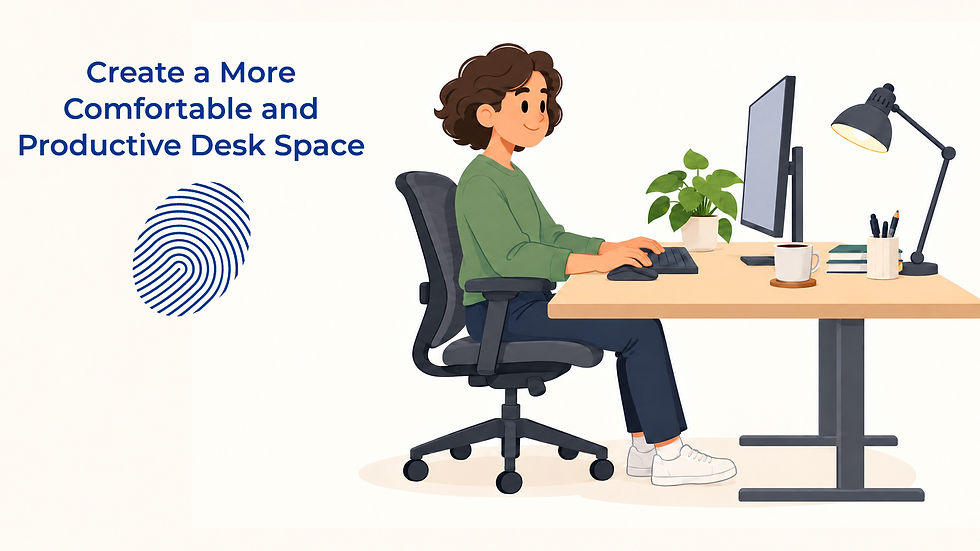
Create a More Comfortable and Productive Desk Space

Author: Mike Scaletti
When you spend hours working at a desk, the way that workspace is arranged can have a surprisingly large effect on how you feel throughout the day. A chair that sits slightly too low, a monitor positioned off to one side, harsh lighting, or a crowded desktop may not seem like major problems on their own. Over several hours, however, those small inconveniences can make it harder to stay comfortable, organized, and focused. You may find yourself constantly shifting in your chair, squinting at your screen, searching for supplies, or getting distracted by everything around you. A more thoughtful desk setup cannot eliminate every challenge of a busy workday, but it can create an environment that makes it easier to concentrate on the work in front of you.
The good news is that improving your workspace does not necessarily require an expensive ergonomic chair, a standing desk, or a complete office makeover. Many effective changes involve adjusting what you already have, moving a few objects, changing your lighting, or adding one inexpensive accessory. The goal is not to create a picture-perfect workspace that looks like something from a design magazine. The goal is to create a practical environment that supports the way you actually work. Whether you work in a traditional office, a shared workspace, a home office, or at a temporary desk, small adjustments can make the space feel noticeably more comfortable and functional.
For job seekers entering office work, temporary employees starting a new assignment, and experienced professionals trying to improve their daily routines, learning the basics of office ergonomics is a useful workplace skill. You may not always have control over the furniture or equipment available to you, especially if you share a workstation or work in different locations. You can still learn how to make reasonable adjustments within those limits. Understanding what feels comfortable, what helps you focus, and how to organize your immediate surroundings gives you a repeatable process you can use almost anywhere.
Why Desk Setup Affects Comfort and Focus
A desk is more than a place to put a computer. During a typical office day, it becomes the physical center of dozens of activities, including typing, reading, answering messages, participating in virtual meetings, reviewing documents, taking notes, and organizing priorities. When the setup works well, you may barely notice it because the workspace allows you to move naturally from one task to another. When the setup works poorly, you tend to notice it constantly. You may lean forward to see your screen, twist toward a second monitor, stretch repeatedly for frequently used items, or struggle to find enough clear space to work.
Comfort matters because physical distractions compete for your attention. If you are repeatedly thinking about an uncomfortable chair, glare on your screen, cold air blowing directly toward you, or a keyboard that feels awkward to reach, part of your attention is being pulled away from your work. Those interruptions may be small, but they can accumulate over the course of a long day. Creating a more comfortable desk setup reduces some of those unnecessary distractions. Instead of continually adjusting your environment, you can devote more attention to completing your tasks.
Your workspace can also influence how easily you transition into a productive mindset. A desk covered in old paperwork, empty cups, tangled cables, personal items, and unrelated notes can create visual competition every time you look away from your screen. A completely empty desk is not necessary, and some people genuinely prefer having several useful objects nearby. The important distinction is whether the things around you support your work or regularly interrupt it. A productive workspace gives the items you use a clear purpose and a reasonably consistent place.
Desk setup can also affect how smoothly you move between different kinds of work. If you frequently take handwritten notes, for example, you may benefit from leaving a small open area beside your keyboard rather than filling every available inch of the desk. If you regularly participate in video calls, you may want your camera, lighting, headphones, and notes positioned so that preparing for a meeting does not require rearranging your entire workspace. If your role involves physical paperwork, you might need a document tray or dedicated review area. Designing your desk around your actual responsibilities is usually more useful than copying someone else's idea of an ideal office.
It is also worth recognizing that there is no single perfect sitting position that everyone should maintain for an entire workday. Even a carefully arranged workstation can become uncomfortable if you remain completely still for hours. Your desk should help you work in a reasonably neutral and supported position, but movement still matters. Standing up periodically, walking to get water, changing position, stretching, or completing a task away from your screen can provide a natural break from sitting. A good workspace supports healthy work habits rather than trying to replace them.
Chair, Monitor, Keyboard, and Lighting Basics
A comfortable desk setup usually begins with your chair because the chair affects how the rest of your workstation feels. Before buying anything new, take a few minutes to explore the adjustments already available on your current chair. Many office chairs allow you to change the seat height, backrest position, armrest height, or tilt, yet employees sometimes use them for months without realizing those controls are available. Adjusting the chair first gives you a better reference point for positioning your keyboard and monitor. The goal is to feel supported rather than perched, stretched, or folded into the chair.
Your feet should have a stable place to rest while you are seated. Depending on the height of your desk and chair, that might mean placing your feet comfortably on the floor or using a footrest. If your chair has to be raised significantly so your arms can reach the desk comfortably, your feet may no longer reach the floor easily. In that situation, a footrest can provide support without requiring you to lower the chair and compromise your upper body position. You do not necessarily need a specialized product, especially when experimenting with your setup, because a sturdy low platform may help you determine whether additional foot support makes you more comfortable.
Pay attention to the relationship between your chair and your desk rather than adjusting them independently. If your chair is too low compared with your work surface, you may find yourself reaching upward or lifting your shoulders while typing. If it is too high, you may lean forward or angle your wrists awkwardly to reach the keyboard. Try to position yourself so your shoulders can remain relatively relaxed while your hands reach your keyboard and mouse without a large stretch. Small changes in chair height can sometimes make a much bigger difference than expected.
Your monitor deserves the same attention because screen position influences where you look for hours at a time. A monitor that is far too low may encourage you to look downward and lean toward the screen. One that is too high can create a different kind of strain because you may continually tilt your head upward. A useful starting point is to place the screen roughly in front of you and adjust it until you can look at your work comfortably without repeatedly craning your neck. The exact position may vary depending on your height, chair, monitor size, vision, and whether you wear glasses.
Distance matters as well. If you continually lean forward to read text, consider whether the screen is too far away or whether increasing the text size would solve the problem more effectively. Many people instinctively move closer to a screen when the real problem is that text, icons, spreadsheets, or browser content are simply displayed too small. Adjusting software settings can sometimes improve comfort without moving any furniture. If you work with multiple monitors, position the screen you use most frequently closest to your natural line of sight rather than forcing yourself to remain turned toward one side for most of the day.
Laptop users face a particular challenge because the screen and keyboard are physically attached. When the keyboard is at a comfortable typing height, the screen may be relatively low. When the laptop is raised to improve screen height, the built-in keyboard becomes difficult to reach. If you spend most of your workday on a laptop at a desk, an inexpensive laptop stand combined with an external keyboard and mouse can provide much more flexibility. This allows you to position the screen and your hands independently instead of compromising between the two.
Your keyboard and mouse should feel easy to reach while you are sitting naturally. If they are placed too far forward, you may gradually begin leaning toward the desk. If the mouse is far to one side, you may repeatedly reach away from your body throughout the day. Bringing both devices closer can reduce unnecessary movement and help your upper body remain more relaxed. People who use a mouse extensively may also benefit from periodically checking whether it has slowly migrated farther away as papers, notebooks, and other items accumulate on the desk.
The angle of your wrists is another useful thing to notice. You do not need to obsess over achieving a perfectly measured position, but you should be aware of whether your wrists are sharply bent upward, downward, or sideways while you type. Sometimes the solution is simply changing the keyboard's position or flattening adjustable feet that raise the back of the keyboard. In other cases, changing your chair height or moving the keyboard closer may feel better. Experiment with small adjustments and pay attention to whether your hands and forearms feel more relaxed.
Lighting may not be the first thing you associate with office ergonomics, but it can have a significant effect on how comfortable your workspace feels. Bright overhead lighting, a window directly behind your monitor, reflections from nearby surfaces, or a dark screen surrounded by a very bright room can all make viewing your computer less pleasant. If possible, position your screen so strong light is not shining directly into your eyes or reflecting prominently from the display. Even rotating a monitor slightly or adjusting window blinds can sometimes reduce glare without changing anything else.
A desk lamp can be useful if you frequently read printed documents or write notes, especially when the rest of the room is dim. Instead of making the lamp as bright as possible, aim for enough light to comfortably see the material you are working with. You may need to experiment with its angle so it illuminates the desk without creating additional screen glare. If you work from home, changing a light bulb, repositioning a lamp, or opening curtains differently may be one of the cheapest improvements you can make. Lighting should help you see your work clearly without becoming another source of distraction.
How to Reduce Clutter and Distractions
A productive desk does not need to be empty, but it should make your most important tasks easier to perform. Clutter becomes a problem when objects compete for working space, hide important information, or force you to repeatedly move things before you can begin a task. A stack of papers that you genuinely need later in the afternoon may be useful. A stack of papers that has been sitting untouched for three months is probably occupying space without contributing much to your workday. The difference is not the amount of material on the desk, but whether each item has a clear purpose.
One of the simplest ways to reduce clutter is to identify what you actually use during an ordinary day. Your keyboard, mouse, notebook, phone, water bottle, headset, and a few frequently referenced materials might deserve easy access. Supplies you use once a week probably do not need to occupy the center of your desk. Items you rarely use can usually be moved into a drawer, cabinet, supply area, or another storage location. This creates more physical space while making your everyday tools easier to find.
Paper can become especially difficult to manage because one document often turns into a stack before anyone notices. If your job still involves printed documents, create simple categories based on what needs to happen next. You might have one place for materials that require action, another for items that need to be filed, and another for documents you must reference regularly. The exact system matters less than consistency. When every piece of paper has a destination, you spend less time repeatedly reviewing the same pile and wondering what each document is doing there.
Digital clutter can create many of the same problems even though it does not take up physical desk space. A desktop filled with dozens of files, a browser with thirty open tabs, constant notification banners, and multiple communication apps competing for attention can make an otherwise clean workstation feel chaotic. Consider whether every notification needs to appear immediately. For work that requires concentration, temporarily silencing nonessential alerts or closing unrelated applications may reduce interruptions. Your physical and digital workspace should work together rather than creating two separate layers of distraction.
Cables are another common source of visual and physical clutter. You do not need an elaborate cable management system to improve them. Start by removing cables that are no longer connected to anything you use, then separate charging cables from permanent computer connections. Reusable ties, clips, or simple cable sleeves can keep cords from spreading across your work surface. This is partly about appearance, but it can also make cleaning easier and prevent you from accidentally pulling the wrong cable when moving equipment.
Personal items can absolutely have a place at your desk. A photograph, plant, favorite mug, small decoration, or meaningful object may make a workspace feel less impersonal, especially if you spend most of your week there. The question is whether personal items are enhancing the environment or gradually taking over useful work space. You do not need to remove everything that makes your desk feel like yours. Instead, choose a few things you genuinely enjoy and give them intentional places where they do not interfere with your work.
The same principle applies to productivity tools. A planner, sticky notes, whiteboard, timer, calendar, or task list can help you stay organized, but too many systems can create more noise than clarity. If your desk contains several competing lists that all track different versions of the same work, simplifying may be more useful than adding another organizational tool. Choose the method you are most likely to check consistently. A basic system that you actually use will usually outperform an elaborate system that requires constant maintenance.
You can also think about your desk in terms of zones. The central area should generally support the work you do most often, while less frequently used supplies can sit farther away. If you regularly write by hand, preserve enough clear space for a notebook. If you review documents while using your computer, leave room to place them beside the keyboard without covering everything else. If your role involves frequent phone calls, keep your headset somewhere accessible instead of burying it under paperwork. Organizing around actions can be more intuitive than organizing around categories alone.
At the end of the day, spending a few minutes resetting your workspace can prevent clutter from rebuilding. Put away materials you have finished using, throw away obvious trash, move completed paperwork to its proper location, and leave yourself enough clear space to begin tomorrow's work. This does not need to become a complicated cleaning routine. Even a brief reset can create a visible stopping point between today's work and tomorrow's responsibilities. Returning to an orderly workspace can also make it easier to start the next morning without immediately dealing with yesterday's unfinished mess.
Low-Cost Improvements for Better Comfort
It is easy to assume that better office ergonomics requires buying premium furniture, but many improvements cost little or nothing. Before you purchase anything, spend a few workdays observing your current setup. Notice what you adjust repeatedly, what feels difficult to reach, where clutter collects, when glare becomes annoying, and what parts of the day feel least comfortable. These patterns can help you identify the actual problem. Buying equipment before understanding the problem can leave you with more objects on your desk without meaningfully improving your experience.
Start with free adjustments. Change your chair height, move your monitor, reposition your mouse, increase text size on your screen, reorganize your most frequently used supplies, and experiment with the direction of your lighting. Move items that have gradually accumulated near your keyboard. Try positioning your monitor directly in front of you instead of slightly to the side. These small changes take only a few minutes, and you can easily reverse them if they do not help.
If your monitor needs to sit higher, you may not immediately need a specialized monitor arm. A stable monitor stand can be inexpensive, and in some situations a sturdy platform may accomplish the same basic goal. If you are experimenting at home, you can temporarily test a different height before purchasing anything. Once you know that raising the screen makes the setup more comfortable, you can decide whether a more permanent stand is worthwhile. Testing first helps you spend money on adjustments that actually address a problem you have noticed.
Laptop stands are another relatively affordable option for people who work primarily from portable computers. Some fold flat, which can be useful for hybrid employees or workers who move between locations. Pairing a basic stand with an external keyboard and mouse can turn a laptop into a more flexible desk workstation without requiring a separate monitor. If you already own a keyboard or mouse, you may only need the stand. This can be especially practical for temporary home office setups where purchasing large furniture does not make sense.
A footrest may also be inexpensive, but again, the purpose matters more than the product. If raising your chair to a comfortable typing height leaves your feet unsupported, adding a stable surface beneath them may make the position feel more natural. If your feet already rest comfortably on the floor, buying a footrest simply because it appears on an ergonomic checklist may accomplish very little. Workplace improvements should respond to your actual setup. There is no requirement to own every accessory associated with office ergonomics.
Small organizational products can also have an outsized impact when they solve a specific recurring problem. A simple document tray can stop active paperwork from spreading across your desk. A small container can keep pens and office supplies together. Adhesive cable clips can keep charging cords from falling behind the desk every time you unplug a device. A headphone hook can free up desktop space. None of these products is essential, but one carefully chosen item can sometimes eliminate an annoyance you encounter several times every day.
Do not underestimate software settings as a free ergonomic tool. Increasing font size, adjusting display scaling, changing screen brightness, enlarging your cursor, using keyboard shortcuts, or modifying notification settings can make your computer easier to work with. If you regularly struggle to read spreadsheets or applications at their default size, there is little value in forcing yourself to work that way simply because the setting is standard. Modern office software usually includes accessibility and display options that can help you tailor the interface to your needs. Learning those settings can improve both comfort and efficiency.
Another free improvement is simply changing your work pattern. If you tend to remain seated for several hours because you become absorbed in a project, look for natural opportunities to move. You might stand while making a phone call, walk to refill your water, stretch between major tasks, or take a brief screen break after completing a concentrated block of work. These moments do not have to interfere with productivity. In many workplaces, they can be incorporated into normal transitions between responsibilities.
If you work for an employer and your workstation is causing persistent discomfort, it may also be worth asking what resources are available. Some organizations provide ergonomic assessments, alternative chairs, monitor stands, footrests, keyboards, or other equipment when employees need them. You may not know what is available until you ask. Approach the conversation practically by explaining the specific issue you are experiencing rather than simply requesting an entire new workstation. A clear description such as needing to raise a monitor or better support your feet gives your supervisor or workplace contact something concrete to address.
For temporary workers and employees using shared desks, portability can be especially valuable. You may not be able to permanently reorganize a workstation, but you can still make small adjustments when you arrive. Take a moment to change the chair height, position the monitor, move the keyboard, and create enough clear space for your immediate tasks. If you regularly rotate between workstations, you may discover that a few small portable items, such as headphones, a notebook, or a compact laptop stand, help you create a familiar working environment wherever you are assigned. The goal is adaptability rather than perfect consistency.
Build a Workspace Around the Work You Actually Do
One reason desk setup advice can feel overwhelming is that people sometimes try to follow every recommendation at once. That is rarely necessary. A graphic designer working with multiple large monitors has different needs from an administrative assistant processing documents, a recruiter spending hours on calls, or an employee who uses a laptop for email and occasional spreadsheets. Your desk should support the activities that occupy most of your day. Start by looking at your routine instead of trying to recreate someone else's workstation.
Ask yourself what you reach for repeatedly. Notice which objects you move every morning and which items remain untouched for weeks. Pay attention to whether you frequently turn toward a second screen, lean toward small text, search for a pen, untangle a charging cable, or clear papers away before starting a task. Those recurring actions are clues. Each one points to an opportunity to make your workspace slightly easier to use.
A useful setup should also be able to evolve. Your responsibilities may change, you may begin working from home more often, you may receive a second monitor, or your team may introduce new technology. Something that worked perfectly last year may no longer fit your routine. Periodically reassessing your desk prevents you from treating its arrangement as permanent. Your workspace is a tool, and like other tools, it should adapt to the work you need to accomplish.
Seasonal changes can matter as well. A workspace beside a window may have excellent lighting during one part of the year but create severe glare when the sun shifts position. A desk that feels comfortable in summer may become unpleasant when heating vents are running during winter. Remote workers may move between rooms as household routines change. Rather than assuming your setup has failed, recognize that environmental conditions change and may require occasional adjustments.
The most productive desk is not necessarily the most attractive desk. Social media often presents highly coordinated offices with matching accessories, decorative lighting, elaborate shelving, and carefully arranged technology. There is nothing wrong with enjoying an attractive workspace, but appearance should serve function rather than replace it. If your inexpensive keyboard feels comfortable, your ordinary office chair supports you well, and your slightly mismatched monitor stand puts the screen in the right place, your setup is doing its job. Productivity does not require a showroom.
The same is true of minimalism. Some people focus better with almost nothing visible on their desks. Others need reference materials, notebooks, calendars, and tools within reach to work efficiently. There is no reason to remove useful objects merely to achieve a particular aesthetic. Instead, distinguish between active tools and accumulated clutter. If something helps you work and has a clear place, it belongs in the workspace.
Make Changes Gradually Instead of Rebuilding Everything
One of the easiest ways to improve a desk is to change one thing at a time. If you simultaneously replace your chair, move your monitor, change your keyboard, rearrange your lighting, and reorganize the entire desk, it can be difficult to determine which changes actually helped. Smaller experiments give you useful feedback. Raise your monitor slightly and work that way for several days. Move your mouse closer and notice whether you stop reaching for it. Adjust your chair and pay attention to how your posture changes during the afternoon.
This gradual approach also helps keep office improvements affordable. You may discover that a problem you thought required expensive equipment can be solved by repositioning something you already own. You might also learn that an accessory you expected to help does not actually fit the way you work. Making purchases only after identifying a persistent problem reduces unnecessary spending. It also keeps your desk from becoming crowded with ergonomic products that were supposed to eliminate clutter.
Consider keeping a simple mental note of what bothers you during the day. If you repeatedly catch yourself leaning forward, investigate your monitor position or display settings. If papers constantly cover your keyboard, create a dedicated place for active documents. If you lose charging cables behind the desk every afternoon, secure them somewhere accessible. If your desk feels dark late in the day, experiment with lighting. Practical workspace design often begins with paying attention to repeated annoyances.
Remember that comfort can also change depending on the task. You may sit differently while typing than while reading a long document. You may prefer to move your keyboard aside when reviewing paperwork. During a video meeting, you might reposition your chair or monitor so you can face the camera naturally. A flexible desk gives you enough space to make those transitions without turning every change into a major rearrangement. Think of the workspace as something you actively use rather than a display that must remain perfectly arranged.
A Comfortable Workspace Can Support Better Work Habits
An organized and comfortable desk will not automatically make someone productive. Deadlines, workload, communication, sleep, stress, and dozens of other factors influence how effectively people work. Your environment is simply one part of that larger picture. However, improving the parts of your workday that you can control can reduce unnecessary friction. When your tools are accessible, your screen is easy to view, your chair feels supportive, and your desk has enough space for the task in front of you, getting started can feel easier.
That reduced friction can reinforce other positive habits. A clear space for your notebook makes it easier to keep useful notes. A visible task list makes it easier to check priorities. An organized file area makes it easier to process paperwork instead of postponing it. A comfortable screen position may make it easier to remain focused during a detailed project. No individual adjustment transforms your workday, but several small improvements can create an environment that better supports the habits you are already trying to build.
A well arranged desk can also make the start and end of the workday more intentional. When you arrive, you can sit down and begin without first searching for equipment or clearing yesterday's clutter. When you finish, a quick reset can help you close out the day's work and prepare for tomorrow. These transitions are particularly useful for remote workers whose desks may be located inside their homes. Creating a visible beginning and ending to the workday can help separate working time from personal time even when both happen in the same physical space.
There is also a professional advantage to understanding how you work best. As you move between jobs, assignments, offices, or remote environments, you become better at quickly evaluating a new workstation. You know how high you prefer your chair, where you want your monitor, which supplies you need nearby, and what kinds of distractions interfere with your concentration. Instead of accepting an uncomfortable setup simply because it was already arranged that way, you can make reasonable adjustments and begin working more effectively. That adaptability is a useful skill in almost any office role.
Start With One Workspace Improvement Today
You do not need to redesign your entire office this afternoon. Look at your desk and identify the single thing that creates the most inconvenience. Maybe your monitor is too low. Maybe your chair needs adjustment. Maybe your keyboard is pushed too far away. Maybe papers have gradually taken over half of your work surface, or glare from a nearby window makes your screen difficult to see during part of the day.
Choose one of those issues and make a small change. Adjust something you already have before deciding whether you need to buy anything. Work with the new setup long enough to notice whether it feels better, then continue refining your workspace over time. A productive desk is rarely created through one dramatic makeover. It develops through a series of practical decisions about what helps you work comfortably and what gets in your way.
Your workspace does not need to be perfect. It simply needs to support you. A few thoughtful adjustments to your chair, monitor, keyboard, lighting, organization, or daily routine can make your desk easier to use and your workday easier to navigate. Start with the part of your workspace you notice most often and improve it one step at a time.
Take the Next Step With The Job Shop
Building strong workplace habits includes learning how to create an environment where you can do your best work. Whether you are beginning a temporary assignment, settling into a new office role, working remotely, or simply trying to make your current workday more comfortable, small improvements can add up. The Job Shop is here to help job seekers and professionals develop the practical skills, confidence, and workplace habits that support long-term career growth.
Your challenge this week is simple: adjust one part of your workspace. Move your monitor, change your chair height, clear one area of your desk, improve your lighting, organize your cables, or reposition your keyboard. Pay attention to how the adjustment affects your comfort and concentration, then use what you learn to make your next improvement.


Comments